
DHIS2 Public Health Reporting & Interoperability
Configure national health registry endpoints, map LOINC metrics and ICD-10 diagnostic indicators to DHIS2 Data Elements, preview aggregated figures with overrides, and audit sync logs.
Medaius features a native DHIS2 (District Health Information Software 2) integration adapter. Designed for healthcare facilities participating in national health management information systems (HMIS), this adapter bridges clinical point-of-care documentation with institutional and public health registries.
1. Setting Up a DHIS2 Connection
Administrators can configure and maintain server connections under Admin → DHIS2 (/admin?section=dhis2):
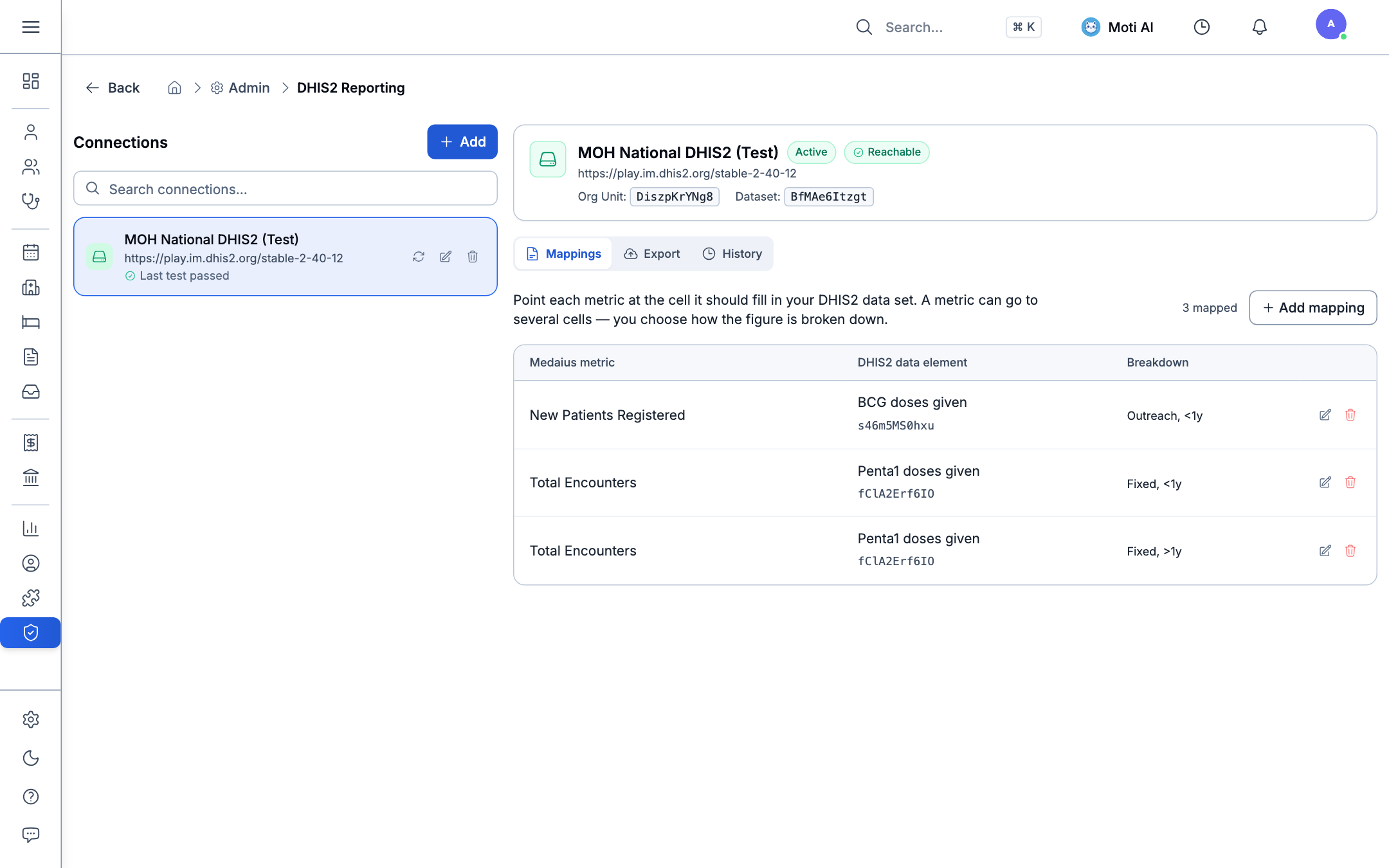
Connection Parameters:
- Connection Name: A recognizable title (e.g., National Public Health HMIS, MOH Child Health Registry).
- Server URL: The public endpoint of your target DHIS2 instance (e.g.,
https://play.im.dhis2.org/stable-2-43-0or your regional ministry server). - Org Unit UID: The alphanumeric 11-character organization unit code assigned to your specific clinic facility in the national hierarchy.
- Authentication:
- Basic Auth: Standard service username and encrypted password.
- Personal Access Token: Secure API token with restricted reporting scopes.
- Test Connectivity: Click Test Connection to verify endpoint reachability and credentials before saving.
[!NOTE] Zero-Leak Encryption: Passwords and access tokens are encrypted in the Medaius database using AES-256. Display fields are permanently masked as
••••••••to safeguard credentials.
2. Mapping Clinical Indicators & Datasets
Before exporting aggregate statistics, clinic metrics must be bound to corresponding DHIS2 Data Element UIDs and Category Option Combos:
1. Built-in Clinic Metric Mappings
Map standard healthcare indicators tracked in Medaius:
- Total Ambulatory Encounters
- New Patient Registrations
- Routine Child Health Immunizations
- Inpatient Ward Admissions & Bed Days
2. ICD-10 Disease Grouping Mappings
Link specific ICD-10 disease categories directly to national surveillance indicators (e.g., mapping acute gastroenteritis A09 or pulmonary tuberculosis A15 to their national registry target codes).
3. Demo Data Sets
Medaius provides out-of-the-box support for certified datasets (such as dataset BfMAe6Itzgt for Child Health), allowing rapid configuration without manual schema modeling.
3. Reporting Period Selection & Data Export
Medaius compiles aggregate figures directly from verified encounter charts and lab records, eliminating manual tally sheets:
Export Workflow:
- Select Reporting Period: Choose the target year and month (e.g., 2026-08 / August 2026) using the visual period picker.
- Review Aggregated Totals:
- The preview table displays destination cells, metric labels, and the automatically computed clinic totals for that time window.
- Manual Overrides:
- If an off-system or field clinic count needs to be adjusted, input the value into the Override field to replace the computed figure in the export payload.
- Mark Period Complete:
- Check the Mark period complete in DHIS2 checkbox to submit official completion flags required by national health ministries.
- Submit to DHIS2:
- Click Export to DHIS2. The system transmits a validated
dataValueSetsJSON envelope directly to the target server.
- Click Export to DHIS2. The system transmits a validated
4. Response Parsing & Sync Audit Logs
Every export execution is permanently recorded under Export Logs:
- HTTP Status & Summary: Inspect whether the registry accepted the batch (
HTTP 200 OK) or flagged schema conflicts. - Import Count Summary: View imported, updated, ignored, and deleted record counts returned by the DHIS2 API engine.
- Conflict Resolution: If the server returns mapping warnings or mismatched category options, the log provides detailed diagnostic messages to guide schema re-alignment.
5. Related Guides & Next Steps
Webhooks API
Broadcast real-time clinical events to external systems via HMAC-secured webhooks.
Clinical Analytics
Monitor internal clinic indicators, patient volume trends, and practitioner productivity.
Roles & Permissions
Control which administrators have permission to manage server credentials and export national datasets.
Was this page helpful?
Help us improve our clinical documentation with your quick feedback.
Data Portability & Record Migration
Import legacy patient records, appointments, and encounters via a 5-step CSV migration wizard, and export structured clinical datasets.
Event-Driven Webhooks API & Subscriptions
Subscribe to real-time clinical events, verify cryptographic HMAC SHA-256 signatures, trigger test pings, and monitor delivery latency and audit logs.