
Inventory & Stock Management
Track pharmacy medications and clinical supplies, monitor batch numbers, manage expiration alerts, and automate stock deductions.
Medaius tracks every stockable item in your clinic — pharmaceuticals, consumable supplies, and clinical equipment — with real-time stock balances, batch-level expiration tracking, low-stock warnings, and automated deductions during point-of-sale dispensing.
1. Inventory Stock Ledger
Access the inventory dashboard from Billing → Inventory or the main inventory shortcut:
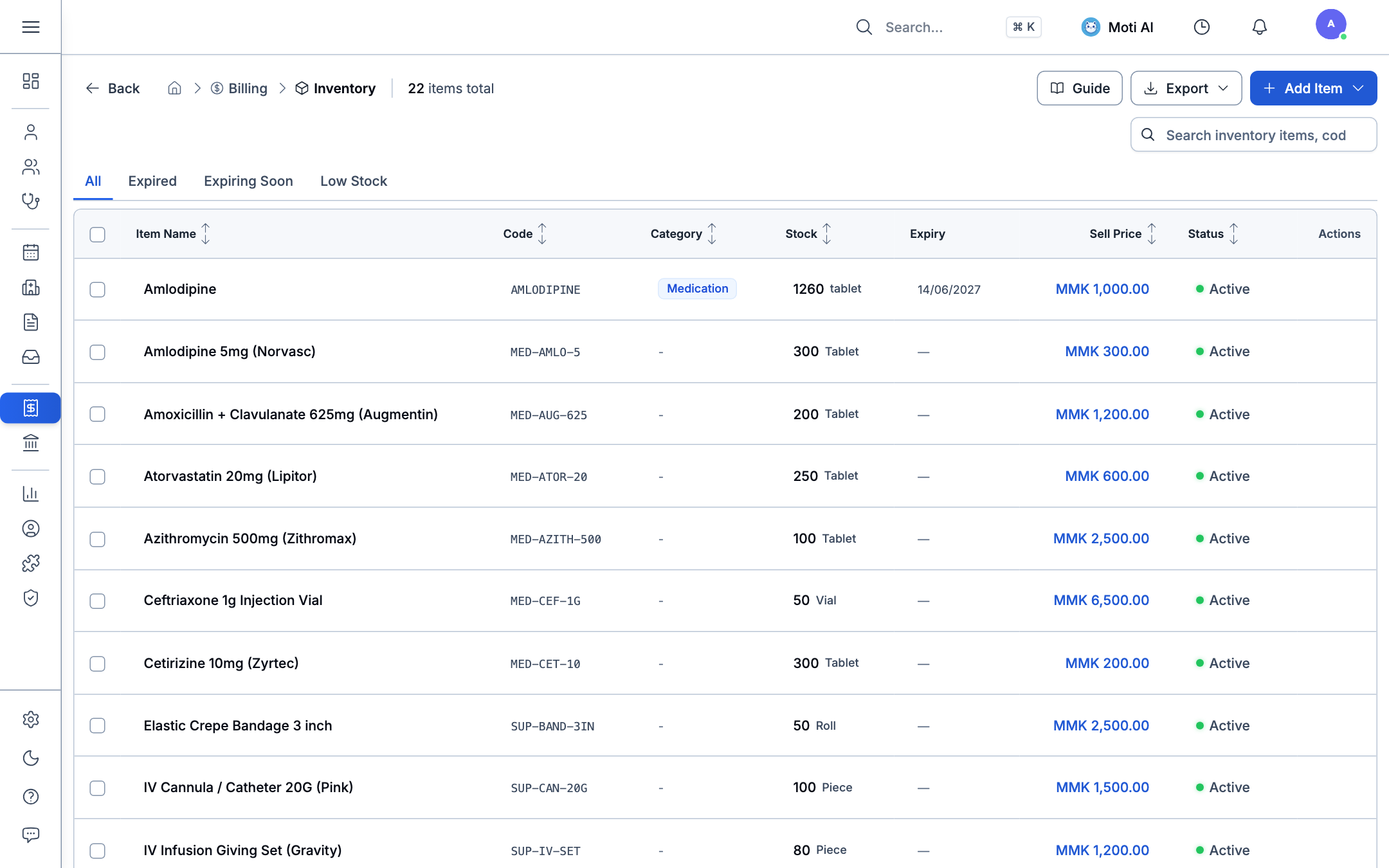
Key Stock Controls & Information:
- Item Name & Code: View standard drug names and clinical SKU codes (e.g.,
AMLODIPINE,MED-AUG-625,MED-ATOR-20). - Category Badges: Categorize items into Medications, Consumables, Supplies, or Equipment.
- Current Stock Balances: Precise tracking in base units (e.g., 1,260 tablets, 50 vials, 100 pieces).
- Expiration Tracking: Live expiry dates (e.g., 14/06/2027). Stock approaching expiry is flagged in the quick filters.
- Selling Price: Standard price per unit in local currency (MMK).
- Status Indicator: Displays whether the item is active and available for prescription and sale.
2. Expiry & Low-Stock Alerts
Above the stock table, four quick-filter tabs provide instant situational awareness:
- All: View complete pharmaceutical catalog.
- Expired: Items that have passed their expiration date (automatically blocked from point-of-sale selection).
- Expiring Soon: Items reaching expiration within the next 30 to 90 days, enabling proactive dispensing or return to suppliers.
- Low Stock: Items that have fallen below their configured minimum threshold, prompting restocking orders.
3. Adding & Restocking Items
Adding New Items
- Click the + Add Item button in the top right.
- Enter item details: generic name, brand name, SKU code, category, unit of measure (e.g., Tablet, Vial, Piece), and default selling price.
- Configure multi-unit packaging (e.g., 10 tablets = 1 strip, 10 strips = 1 box) with distinct barcodes and package pricing.
Restocking & Batch Deliveries
- Open any medication and navigate to its Batches tab.
- Record delivery details: lot/batch number, quantity received, purchase unit cost, and expiration date.
- The system implements First-Expiry-First-Out (FEFO) to ensure older batches are dispensed first.
Data Import & Export
Click Export to download your current inventory ledger as CSV for stock auditing, or use Import to upload supplier catalog spreadsheets in bulk.
Was this page helpful?
Help us improve our clinical documentation with your quick feedback.
Billing, Invoices & Point of Sale (POS)
Process patient checkouts, collect cash and card payments, manage invoice ledgers, and configure standardized clinic service fees.
Sponsor & NGO Program Management
Register health coverage sponsors, configure subsidized billing codes, link NGO programs to patients, and track insurance claims.