
Event-Driven Webhooks API & Subscriptions
Subscribe to real-time clinical events, verify cryptographic HMAC SHA-256 signatures, trigger test pings, and monitor delivery latency and audit logs.
Medaius provides a robust Event-Driven Webhooks Engine, allowing clinical software ecosystems to react immediately to healthcare events. External systems—such as laboratory information management systems (LIMS), third-party pharmacy dispatch platforms, accounting ERPs, and automated patient messaging services—can subscribe to real-time HTTPS webhooks with cryptographically verified payloads.
⚠️ The Webhooks module must be enabled first — see Marketplace, Add-ons & Module Governance — before the Webhooks section appears under Admin.
1. Registering a Webhook Subscription
- Go to Admin → Webhooks (
/admin?section=webhooks). - Click Add (top-right of the webhook list, or Add Webhook if you have none yet) to open the subscription form.
- Fill in the fields:
- Webhook Name — a descriptive label (e.g., Make.com Patient Sync).
- Endpoint URL — the destination on your receiving server. Must start with
https://. - Description (optional) — a note on what this webhook is for.
- Subscribe to Events — check every event this endpoint should receive, or click Select All / Deselect All. At least one event is required. Currently supported events:
| Event Identifier | Trigger Condition |
|---|---|
patient.created | A new patient chart is registered. |
patient.updated | Demographic or contact details are modified. |
appointment.created | An appointment is booked via desk or online portal. |
appointment.updated | An existing appointment is changed. |
appointment.cancelled | An appointment is cancelled. |
encounter.started | A clinician opens a consultation workbench. |
encounter.completed | An encounter is finalized. |
invoice.created | A draft bill is generated from consultation charges. |
invoice.paid | Cashier collects payment or marks the invoice settled. |
- Click Register Webhook. A one-time banner shows your signing secret — click Copy and store it securely now; it is never shown again.
2. Cryptographic HMAC SHA-256 Signature Verification
To guarantee that webhook payloads originate strictly from Medaius and have not been intercepted, spoofed, or tampered with in transit:
1. The Secret Key
When a webhook subscription is registered, Medaius generates a dedicated 64-character hexadecimal secret (shown once, in the post-creation banner). Keep this secret secure on your receiving server.
2. The Signature Headers
Every delivery carries three headers:
X-Medaius-Event: patient.created
X-Medaius-Timestamp: 1735689600
X-Medaius-Signature: a3f5b90214c78d4e92b8d0354117a1...
The signature is an HMAC SHA-256 hex digest — computed over "{timestamp}.{raw_body}" (the timestamp value, a literal ., then the exact raw request body), keyed with your secret. Verify against that concatenated string, not the raw body alone, or the signature will never match.
3. Verification Implementation (Node.js & Python Examples)
// Node.js / Express verification example
const crypto = require('crypto');

function verifyMedaiusSignature(rawBody, timestampHeader, signatureHeader, webhookSecret) {
  const signedPayload = `${timestampHeader}.${rawBody}`;
  const computedSignature = crypto
    .createHmac('sha256', webhookSecret)
    .update(signedPayload, 'utf8')
    .digest('hex');

  return crypto.timingSafeEqual(
    Buffer.from(computedSignature, 'hex'),
    Buffer.from(signatureHeader, 'hex')
  );
}
# Python / FastAPI verification example
import hmac
import hashlib
def verify_medaius_signature(raw_body: bytes, timestamp_header: str, signature_header: str, webhook_secret: str) -> bool:
signed_payload = f"{timestamp_header}.{raw_body.decode('utf-8')}".encode('utf-8')
computed_signature = hmac.new(
webhook_secret.encode('utf-8'),
signed_payload,
hashlib.sha256
).hexdigest()
return hmac.compare_digest(computed_signature, signature_header)3. Test Ping & Delivery Auditing
Testing Endpoint Connectivity
- Find the webhook in the list on the left of the Webhooks screen.
- Click Test Ping on its card. Medaius dispatches an immediate test payload and reports whether your endpoint acknowledged it with
HTTP 200 OK.
Delivery Logs & Retry Behavior
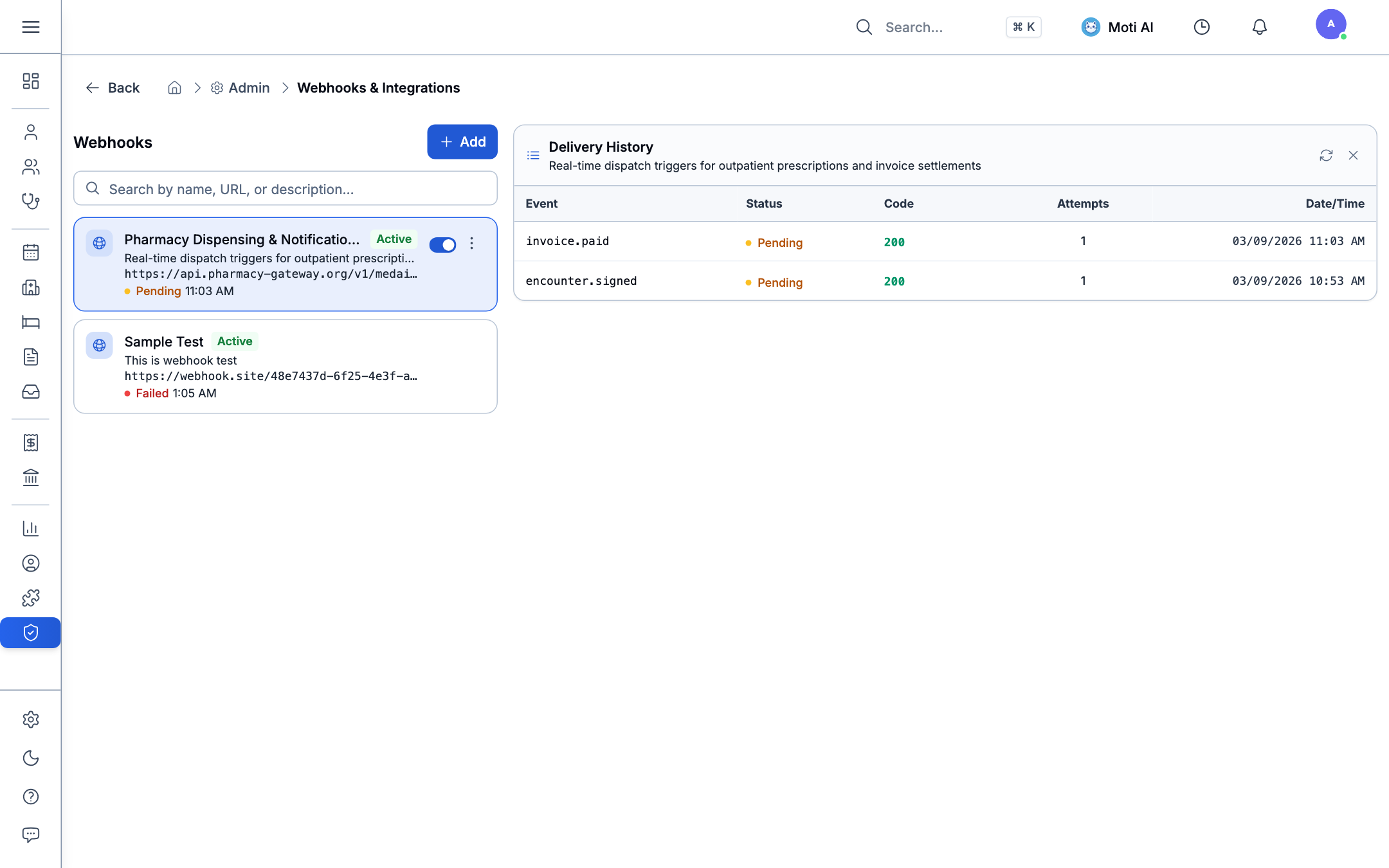
- Click any webhook in the list to select it — its Delivery Logs panel opens on the right.
- Click the refresh icon in the panel header to pull the latest deliveries.
- Inspect each entry for status, response latency, and the full request/response payload.
If your endpoint is down or returns a non-2xx status, Medaius retries automatically with exponential backoff: 5s, 10s, 20s, 40s, then 80s (5 attempts total). If all 5 fail, that delivery is marked failed — and after 5 consecutive fully-failed deliveries, the subscription is automatically disabled so a dead endpoint doesn't keep consuming retries. Re-enable it from the webhook's toggle once the endpoint is fixed.
4. Related Guides & Next Steps
DHIS2 Interoperability
Synchronize aggregate statistics directly with national public health ministries and HMIS registries.
Roles & Permissions
Restrict webhook endpoint management to authorized system administrators and integration engineers.
Clinical Encounters
Review how encounter signing triggers automated webhook broadcasts and downstream invoice generation.
Was this page helpful?
Help us improve our clinical documentation with your quick feedback.
DHIS2 Public Health Reporting & Interoperability
Configure national health registry endpoints, map LOINC metrics and ICD-10 diagnostic indicators to DHIS2 Data Elements, preview aggregated figures with overrides, and audit sync logs.
Moti AI Clinical Assistant & Autonomous Agent
Leverage Moti AI for clinical decision support, natural language clinic queries, @-mention patient lookups, automated summaries, and full-page AI workspaces.