
Marketplace, Add-ons & Module Governance
Enable or disable modular clinical capabilities, manage subscription plan entitlements, and configure hospital extensions.
Medaius is built around a flexible modular architecture. Rather than forcing every clinic to navigate features they do not use, administrators can activate exactly the modules they need from the centralized Marketplace.
1. The Add-ons & Modules Marketplace
Access the module governance hub by clicking the Puzzle Piece (Marketplace) icon in the sidebar (/marketplace):
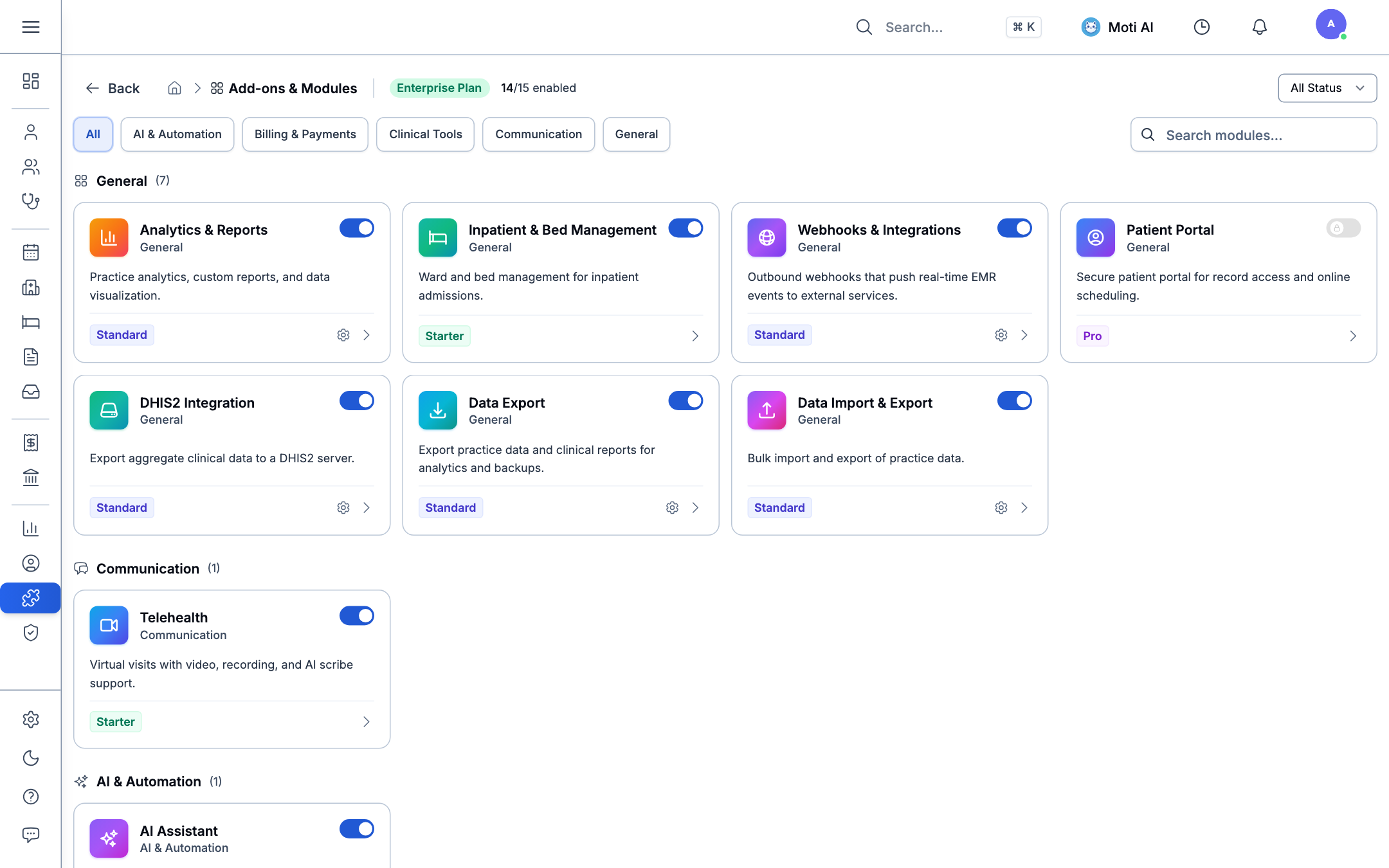
Marketplace Overview:
- Organization Subscription Tier: Displays the active tier (e.g., Enterprise Plan) and the count of enabled capabilities (14/15 enabled).
- Category Filter Tabs: Quickly browse modules by functional area:
- All: Complete catalog.
- AI & Automation: Moti AI clinical assistant, voice scribe co-pilot.
- Billing & Payments: POS checkout terminal, service fee schedules, invoices.
- Clinical Tools: Inpatient & bed management, group therapy cohorts, custom forms.
- Communication: Telehealth video consultations, team announcements.
- General: Outbound webhooks, DHIS2 national reporting, CSV data import/export.
2. Enabling or Disabling a Module
- Find the module card you want (use the category tabs or scroll the catalog).
- Click the toggle switch in the top-right of the card — it flips blue when the module is active, grey when it's off. The change takes effect immediately, clinic-wide.
- If the module needs setup — Webhooks, DHIS2, and other integration-style modules do — a gear icon appears on the card once it's enabled. Click it to open that module's configuration screen (API credentials, callback URLs, or reporting endpoints, depending on the module).
- Staff permissions update automatically when a module is turned on — e.g. enabling Inpatient provisions the relevant bed-management permissions to roles that need them, with no separate permissions step required.
A module you don't have entitlement for (outside your current plan tier) shows a locked toggle instead — see Pricing to upgrade.
Was this page helpful?
Help us improve our clinical documentation with your quick feedback.
Clinical Analytics & Custom Chart Builder
Monitor clinic performance, customize dashboards, and build custom analytical charts using the dynamic Query Builder.
Team Announcements & Communications
Coordinate clinic staff with real-time newsfeeds, pinned notices, urgent alerts, threaded discussions, and clinical activity widgets.