
Roles, Permissions & Access Control
Configure multi-tiered role levels (L1–L9), manage granular functional permissions via the Role Form Modal, restore role snapshots, and inspect RBAC audit trails.
Medaius provides an enterprise-grade Role-Based Access Control (RBAC) engine built specifically for clinical institutions. This ensures healthcare providers, billing personnel, nurses, and coordinators have access strictly to the clinical data and operational tools required for their job function.
1. Roles & Permissions Management Directory
Administrators can configure and review all organizational roles under Admin → Roles (/admin?section=roles):
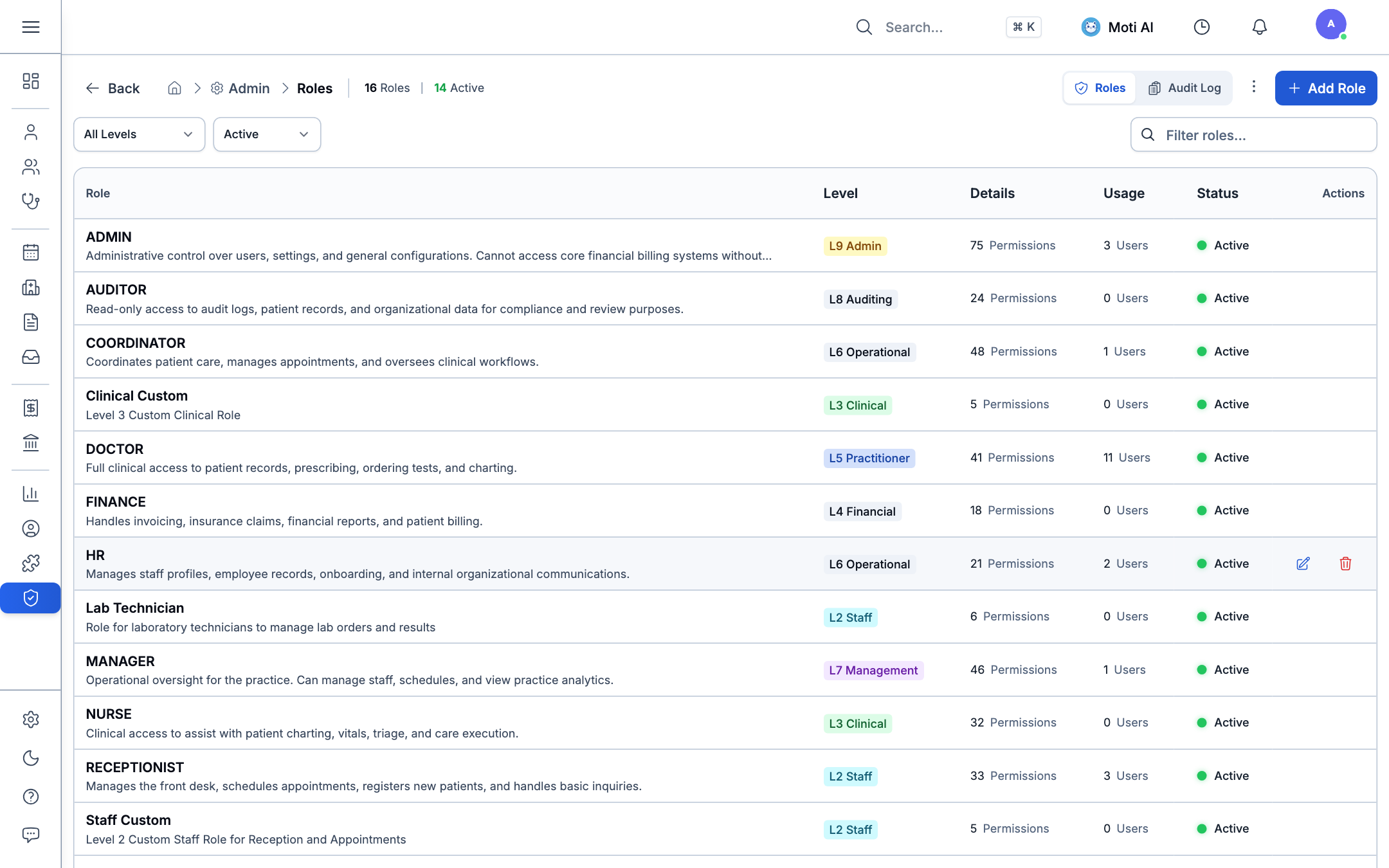
Directory Overview:
- Active Roles Summary: Real-time counter of total configured roles (e.g., 16 Roles, 14 Active).
- Security Levels (L1–L9):
- L9 Admin: Full administrative authority over users, system configurations, and security settings.
- L8 Auditing: Read-only oversight of audit logs, compliance reports, and patient charts.
- L7 Management: Operational clinic oversight, practitioner scheduling, and clinical analytics.
- L6 Operational / HR: Clinic coordinators, appointment managers, and staff onboarding.
- L5 Practitioner / Doctor: Full clinical access to charts, SOAP notes, lab orders, and prescriptions.
- L4 Financial: Invoicing, cash desk operations, insurance claims, and billing reconciliations.
- L3 Clinical Support / Nurse: Vitals logging, triage notes, and clinical checklists.
- L2 Staff / Front Desk: Patient check-ins, registration, and calendar booking.
- Detailed Metrics: Live counts of total assigned staff per role (e.g., 11 Users in DOCTOR role, 3 in RECEPTIONIST).
- Audit Log Tab: Direct access to chronological logs tracking every permission change, role sync, or snapshot restore.
2. Granular Permissions Configuration Modal
Clicking + Add Role or choosing Edit on any existing role opens the Role Configuration Modal:
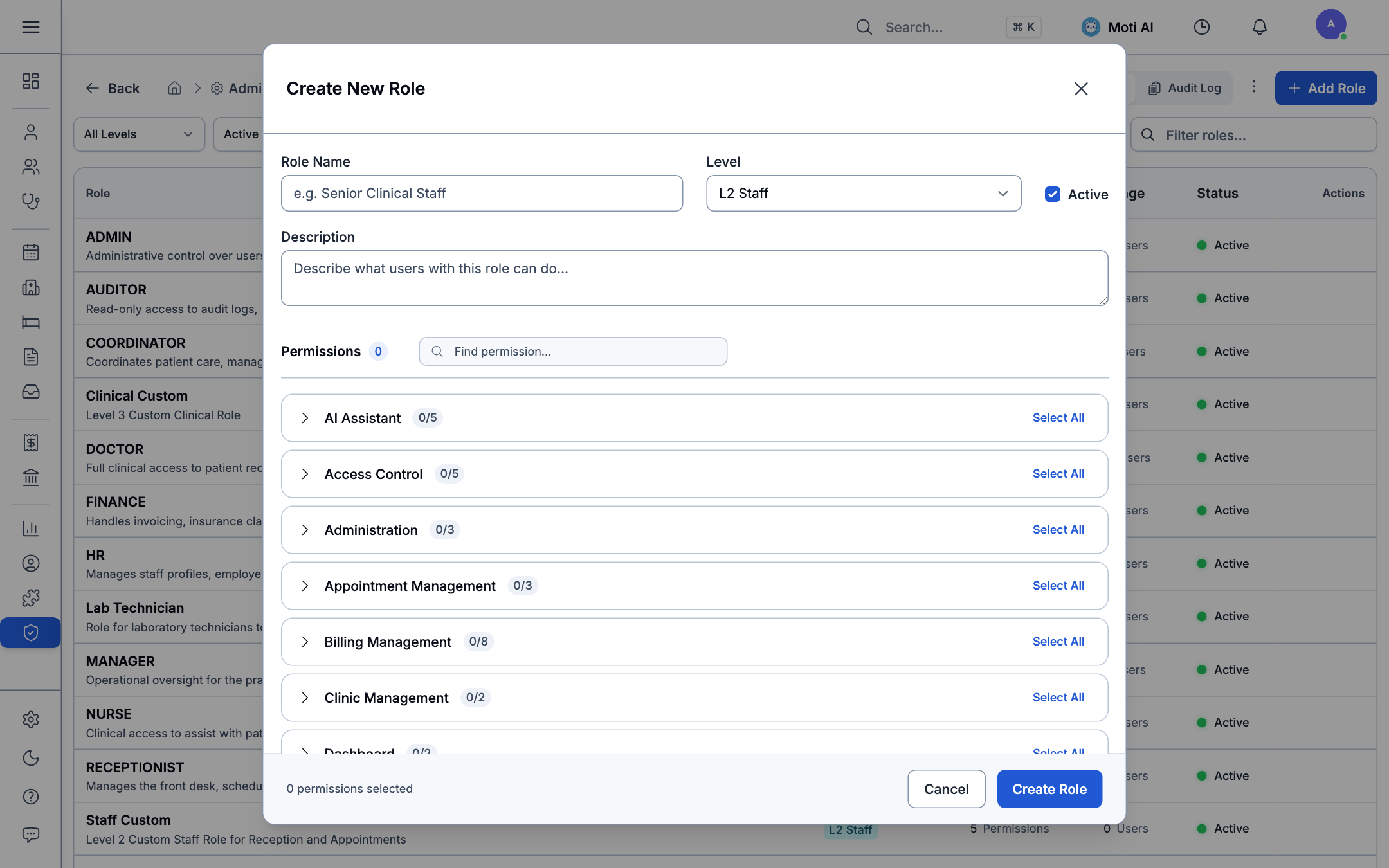
Key Modal Configuration Sections:
-
Role Identification:
- Role Key / ID: Unique system identifier (e.g.,
CLINICAL_FELLOW,TRIAGE_NURSE). - Display Name: Human-readable label displayed across the workspace interface.
- Description: Clinical responsibilities and operational boundaries.
- Hierarchy Level: Select level L1 to L9 to enforce delegation rules (users cannot edit roles at or above their own level).
- Role Key / ID: Unique system identifier (e.g.,
-
Categorized Permission Matrix (Module Checkboxes): Medaius separates functional permissions into granular checkboxes across medical domains:
Functional Domain Key Granular Permissions Clinical Impact Clinical Encounters encounter.read,encounter.write,encounter.sign,encounter.amendControls who can draft, legally sign, or append addendums to visit notes. Patient Registry patient.read,patient.write,patient.delete,patient.exportProtects patient identity data, preventing unauthorized export or record modification. Appointments appointment.read,appointment.write,appointment.cancelManages doctor scheduling calendars, room assignments, and walk-in queues. Billing & Finance billing.invoice.create,billing.payment.collect,billing.voidGates cashier registers, fee overrides, invoice adjustments, and sponsor subsidies. Inventory & Pharmacy inventory.read,inventory.dispense,inventory.stock_adjustControls medication dispensing from dispensary stocks and inventory ledger auditing. Custom Forms custom_forms.read,custom_forms.manage,custom_forms.publishDetermines who can design questionnaires, publish public links, and approve triage responses. Integrations & System webhook.manage,dhis2.manage,admin.configRestricts access to API webhooks, national DHIS2 reporting, and clinic-wide settings. -
Select All / Clear Category:
- Easily toggle entire functional groups with a single click during role setup.
3. Role Snapshots & Restoring Defaults
To safeguard clinical continuity and prevent catastrophic configuration drift:
- Automatic Snapshots: Medaius automatically saves an encrypted snapshot before any role modification is applied.
- Restore Snapshot: Click Restore Snapshot to inspect past revisions with timestamped diffs and roll back permissions instantly.
- Sync Official Defaults: If permissions become inconsistent after major platform upgrades, click Restore Defaults to safely re-align system roles (Doctor, Nurse, Cashier, Receptionist) to certified clinical baselines.
4. Related Guides & Next Steps
Staff & Duty Rosters
Assign configured roles to practitioners and establish clinic shift timetables.
Security & Access Control
Configure session timeouts, MFA multi-factor authentication, and practitioner-patient relationship rules.
Webhooks & API Security
Secure API communications with cryptographic HMAC signatures and permission-scoped webhook tokens.
Was this page helpful?
Help us improve our clinical documentation with your quick feedback.
Organization Configuration & Access Control
Configure clinic branding, patient access control modes, appointment queues, security policies, and personal user settings.
Clinical Analytics & Custom Chart Builder
Monitor clinic performance, customize dashboards, and build custom analytical charts using the dynamic Query Builder.