
Data Portability & Record Migration
Import legacy patient records, appointments, and encounters via a 5-step CSV migration wizard, and export structured clinical datasets.
Medaius guarantees complete data ownership and data portability. Clinics transitioning from legacy software, hospital spreadsheets, or paper charts can migrate records seamlessly using our built-in Data Management suite.
1. The 5-Step CSV Import Wizard
Under Admin → Data Management, clinic administrators can import up to 1,000,000 records per job:
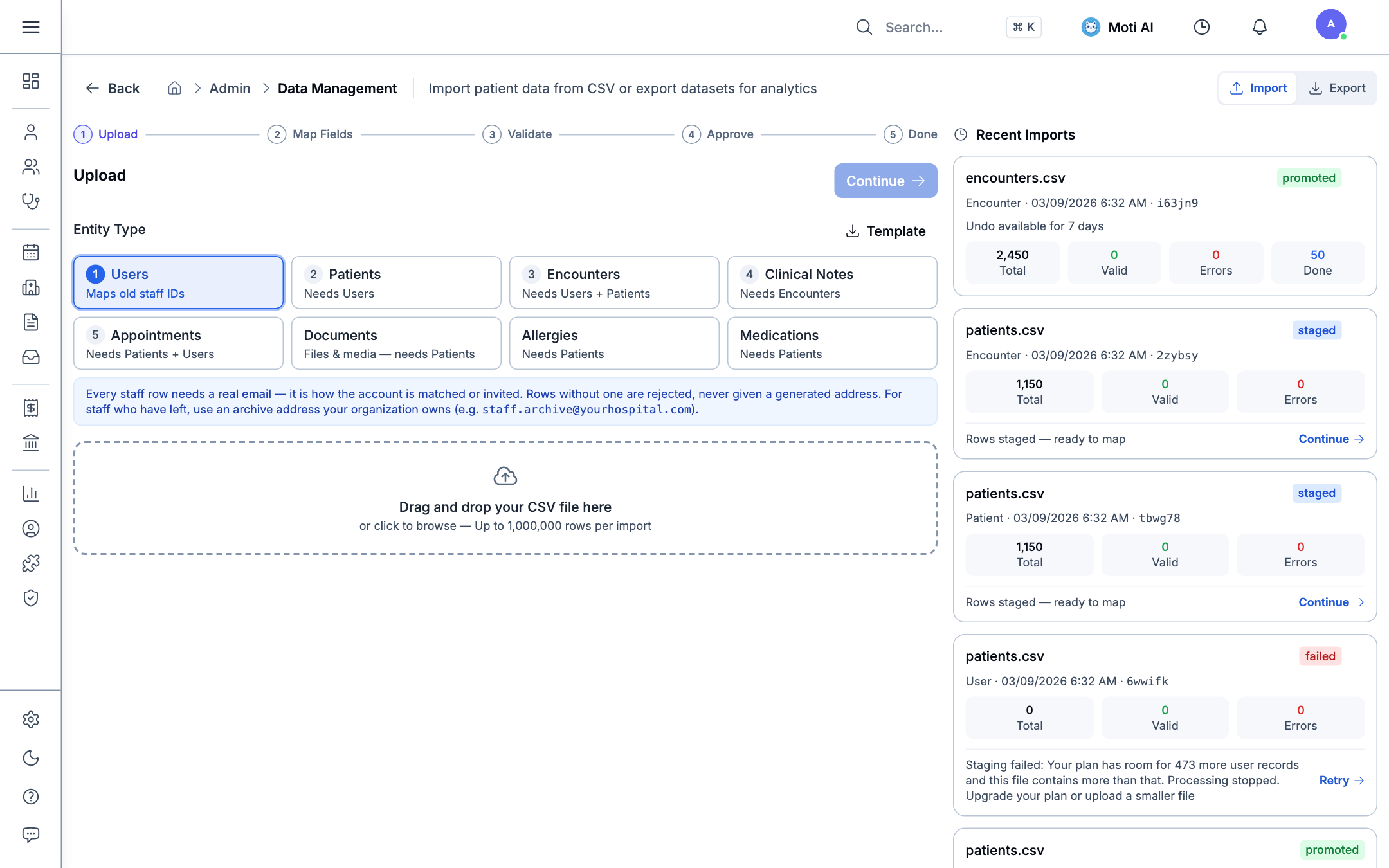
The 5 Guided Steps:
- Upload:
- Select the target Entity Type: Users, Patients, Encounters, Clinical Notes, Appointments, Documents, Allergies, or Medications.
- Download the official CSV Template for your selected entity type.
- Drag and drop your
.csvspreadsheet file into the upload zone.
- Map Fields: Match your custom spreadsheet column headers to standard Medaius clinical database fields.
- Validate: The automated validation engine checks email formats, phone numbers, birth dates, and identifies potential duplicates.
- Approve: Review staged records with error summaries before committing them to the live database.
- Done: Records are safely promoted to active clinical tables.
Recent Imports Audit Ledger
On the right-hand panel, administrators can track all previous import batches:
- Status badges:
promoted(live in database),staged(ready to map/approve), orfailed(exceeds capacity or formatting errors). - Safety undo window: Promoted imports can be undone within 7 days if errors are detected post-migration.
2. Exporting Clinical Data
Medaius ensures you are never locked into a single platform:
- Click the Export button in the top right of Data Management.
- Export full patient rosters, appointment logs, or billing summaries into standard CSV format.
- Generate comprehensive FHIR-compliant clinical summaries or PDF charts directly from individual patient records.
Was this page helpful?
Help us improve our clinical documentation with your quick feedback.
Sponsor & NGO Program Management
Register health coverage sponsors, configure subsidized billing codes, link NGO programs to patients, and track insurance claims.
DHIS2 Public Health Reporting & Interoperability
Configure national health registry endpoints, map LOINC metrics and ICD-10 diagnostic indicators to DHIS2 Data Elements, preview aggregated figures with overrides, and audit sync logs.